CRONOS-AI · User guide
A supervised software factory

Software manufactured by AI.

Factory-Engineered. Cronos AI is an opinionated software factory: AI agents specify, build, review, verify, and document each task, Rust enforces the rules, and a human approves the specs and the final code.

Cronos-AI: supervised software factory with a clock-inspired agent network
01 · Get started

Prepare a project

Build Cronos-AI with cargo build --release, then run ./scripts/cronos-ai. From a regular terminal the launcher opens the dedicated cronos-ai Herdr session and workspace; inside a Herdr pane it starts directly there. Supervised task execution requires Herdr. Your project must point to a local Git repository with a committed openspec/ directory (openspec init, then commit) and have a check command. Keep the repository's main working tree clean and configure a commit identity, because agents and Cronos-AI commit to the task branch.

Requirements

  • A Rust toolchain to build Cronos-AI.
  • Pi as worker and one-shot planner; a Rust runner drives each task.
  • Herdr to run and supervise the agents.
  • OpenSpec for the specifications.
  • Git, plus a project repository with a committed openspec/ directory.
  • A check command for the project, such as ./scripts/check.sh.

At startup, Cronos-AI checks for required tools and prompts if any are missing. It does not install tools automatically.

Work from the dashboard

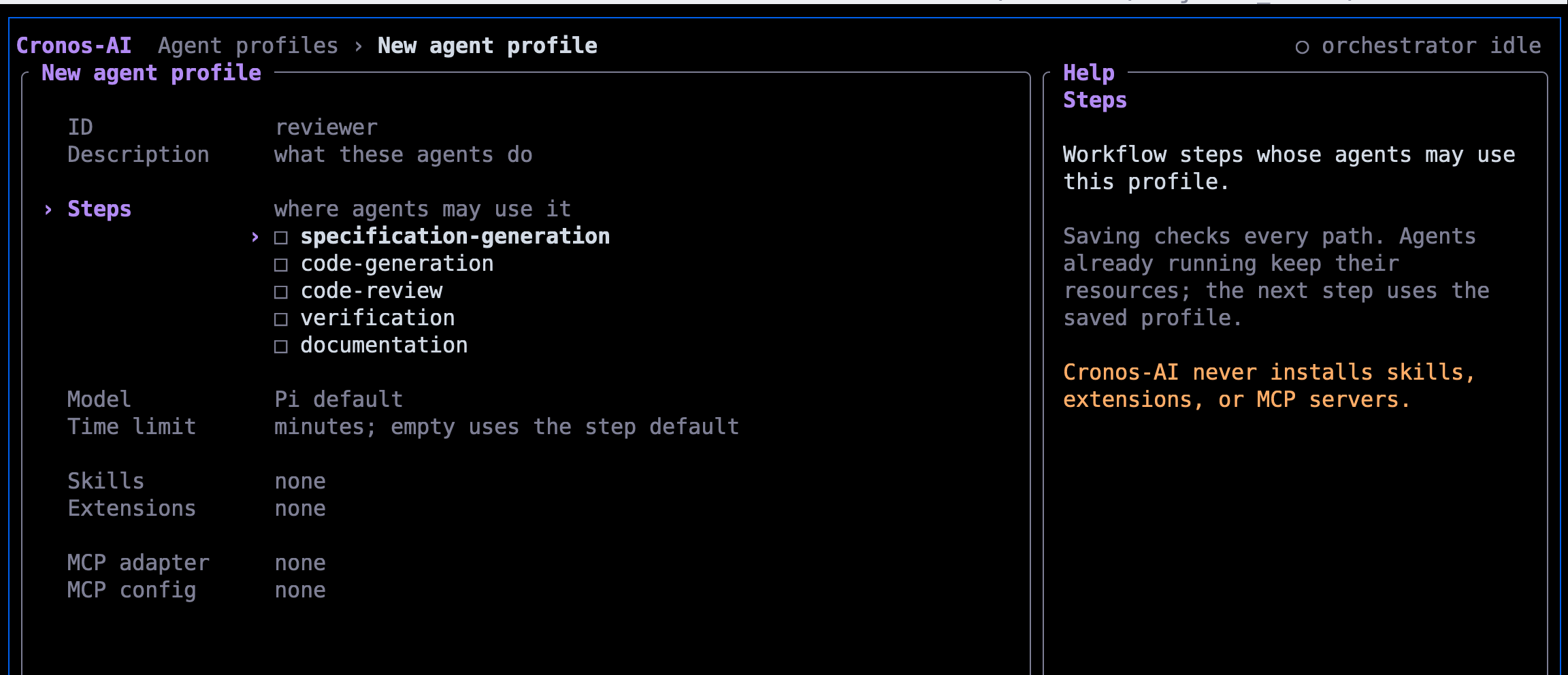
The Cronos-AI dashboard editing an agent profile: its ID, description, workflow steps, model, time limit, skills, extensions, and MCP settings, with help for the focused field.

Create projects and tasks, plan tasks from requirements, start and review work, and manage agent profiles in the TUI. Every form checks its input before saving.

Prefer the command line?
./target/release/cronos-ai project create demo \
  --repository /path/to/repository
./target/release/cronos-ai project set-check-command \
  <PROJECT_ID> -- ./scripts/check.sh
./target/release/cronos-ai task create <PROJECT_ID> \
  "Build the feature" --priority high

Each command prints JSON with the new IDs. The repository needs a committed openspec/ directory, and the check command runs without a shell after verification.

  1. Launch the dashboard: run ./scripts/cronos-ai after building. Outside Herdr it creates or attaches to its dedicated session; inside Herdr it starts in the current pane. Run ./target/release/cronos-ai directly for the TUI without the launcher.
  2. Select and start: choose the project with Enter; on its task list press s to start the next ready task. Press b to switch between the table and a kanban board; both show the project's progress. Press g to list the project's requirements and p to have a read-only planner propose the tasks that cover them; y creates them.
  3. Follow the task: open it with Enter. The details page shows its status, step and elapsed time, worktree, branch, OpenSpec change, decisions, and agent activity. Press v for the review view, which ends with each changed file's diff; ] and [ jump between files.
A requirement is added, the planner proposes tasks, and the next task runs from specification to local merge with two human approvals. The project is fake; the TUI and the task runner are real.

You can also create a project from the TUI: press n on the project list, enter its required name and optional description, Git repository path, and check command, then press Enter. Use Tab to move between fields or Esc to cancel; validation errors leave the form open so you can correct them.

On a project's task list, press n to add a task. Enter its title and optional description; priority defaults to Medium and dependencies can be selected from same-project tasks. Use ←/→ to change priority, ↑/↓ and Space to choose dependencies, then Enter to create or Esc to cancel. New tasks remain Pending; press s separately to start ready work.

The project form is only for new projects. For an existing project, use project set-repository <PROJECT_ID> --repository /path/to/repository and project set-check-command <PROJECT_ID> -- ./scripts/check.sh before starting work.

02 · Workflow

Parallel tracks, ordered steps, explicit approvals

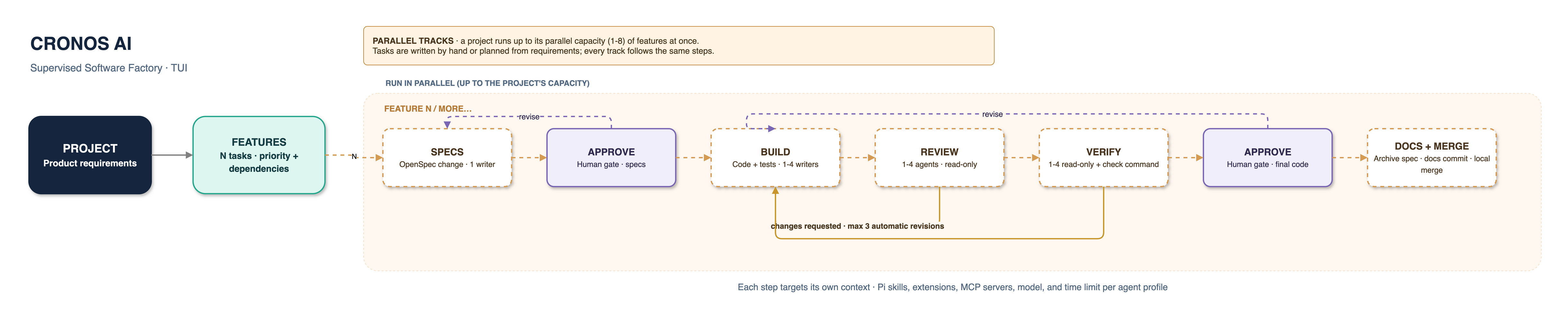
A project can contain many features and tasks. By default the queue runs one task at a time; raise the project's parallel capacity to run several on separate feature tracks, never two that share a requirement. Independent agents within each task's active step also run in parallel.

1. Specifications

One agent writes and commits the task's OpenSpec change; Rust requires openspec validate --strict to pass. The task waits at a human approval gate before code generation.

2. Build and verify

One agent implements and commits; 1-4 read-only reviewers and verifiers run in parallel, then Rust runs the check command. Findings or a failing check send the code back automatically, up to 3 times per attempt.

3. Approve and complete

Final-code approval unlocks documentation. Rust archives the OpenSpec change, makes one documentation commit, and merges locally, or pushes the merge or opens a pull request when the project publishes that way. A merge conflict returns the task to code generation.

Local by default: Cronos-AI pushes nothing unless the project's publish mode is push or pull-request (cronos-ai project set-publish). With cronos-ai project set-releases on, each local merge is also tagged as the next semantic version and added to CHANGELOG.md. A failed push or pull request stops the task with Error; retry the step once the cause is fixed.
A project fans out to independent feature tracks; each track proceeds through specs, build, verify, and human approval.
Each feature track runs one task through its steps; a project runs as many tracks as its parallel capacity allows.
03 · Human controls

Review, revise, recover, or abandon

Approval-stage rejection requests revision; it does not set the task status to Rejected. Rejected is reserved for explicitly abandoning the entire task.

Task statusMeaningWhat you can do
PendingWaiting to be selected by the ready queue.Priority and dependencies determine when it becomes ready.
In ProgressThe active workflow is running, waiting at an approval gate, waiting for a clean base at local merge, or interrupted.v reviews the work; y approves; n requests revision and asks for a note; s on the task list resumes an interrupted task or retries the merge.
ErrorA failure stopped the workflow; remaining agents in that step are cancelled.t retries only the failed step, keeping the attempt; r retries specs; c supplies clarification and regenerates specs. r and c discard the failed attempt's worktree and branch.
CompletedRequired steps and local merge succeeded.Inspect the result in the project repository.
RejectedA human explicitly abandoned the whole task.Enter a reason when pressing a in task details.

Use r outside an Error task to refresh. Press Backspace or Esc to go back, and q to quit.

04 · Architecture

Rust drives · Pi plans and builds · Herdr runs agents · OpenSpec specifies

The boundary is intentional: a one-shot Pi planner may only read the worktree and propose each step's agents, and the agents may only write their result files; the Rust host runs the steps and alone validates and persists status transitions, approvals, and worktree operations.

flowchart LR
  human(["Human operator"])
  tui["Cronos CLI / TUI<br/>Review view · approvals<br/>resume · recovery"]

  subgraph host["Cronos Rust host · state owner"]
    queue["Ready queue<br/>Priority or agent prioritizer<br/>parallel tracks up to capacity"]
    state[("Project + task JSON<br/>check command · revisions")]
    workspace["Per-attempt worktree<br/>local branch · .cronos/ excluded"]
    stepRunner["Workflow engine<br/>Per-task step lock · agent limits<br/>prompt contract · JSON results<br/>worktree checks"]
    check["Project check command<br/>after verification agents<br/>no shell · process group"]
    revision(["Automatic revision<br/>back to code generation<br/>max 3 per attempt"])
    approval{{"Human approval<br/>Specs + final code"}}
    archive["Archive OpenSpec change<br/>single docs commit"]
    merger["Local merge<br/>dirty base waits"]
  end

  subgraph orchestration["Rust orchestration"]
    runner["Task runner process<br/>one per active task<br/>loops until a gate"]
    planner["Step planner<br/>one-shot read-only Pi<br/>default plan on failure"]
  end

  subgraph herdr["Herdr agent runtime"]
    agents["Step agents<br/>1 spec author; 1-4 writers, reviewers,<br/>verifiers, or docs agents<br/>per-step time limits; one pane each"]
  end

  openspec["OpenSpec<br/>one change per task"]
  repository[("User's local Git repository<br/>committed openspec/")]
  completed(["Completed"])
  error(["Error"])
  rejected(["Rejected"])

  human --> tui
  tui -->|create project, task, check command| queue
  queue -->|load and persist| state
  queue -->|assign attempt| workspace
  queue -->|launch or resume task| runner
  workspace --> repository

  runner -->|task, findings, notes| state
  runner -->|plan each agent step| planner
  planner -->|read only| workspace
  runner -->|validated agents| stepRunner
  stepRunner -->|prompt + Rust contract| agents
  agents -->|JSON result files; wait for all| stepRunner
  agents -->|work in assigned worktree| workspace
  agents -->|specification step| openspec
  stepRunner -->|verification passed| check
  stepRunner -->|changes_requested| revision
  check -->|non-zero exit or leftover files| revision
  revision --> stepRunner
  check -->|passed| approval
  stepRunner -->|validated step and activity| state
  stepRunner -->|specs validated| approval
  tui -->|review, approve or request revision| approval
  approval -->|validated decision| state
  approval -->|continue or revise| stepRunner
  stepRunner -->|documentation agents done| archive
  archive --> workspace
  archive -->|after the runner stops| merger
  merger <-->|worktree and local merge| repository
  merger -->|success| completed
  merger -. conflict: abort .-> revision
  merger -. other merge failure: abort .-> error
  completed --> state

  agents -. crash, timeout, invalid or failed result: cancel siblings .-> error
  stepRunner -. worktree or OpenSpec check failed .-> error
  revision -. limit reached .-> error
  error -->|stop stale agents, then retry step: same attempt| stepRunner
  error -->|retry or clarify: new attempt| workspace
  error -->|human abandons| rejected
  rejected --> state

  classDef person fill:#F1F5FA,stroke:#667A90,color:#16283D,stroke-width:1.5px
  classDef host fill:#EAF5F4,stroke:#188C83,color:#153C42,stroke-width:1.5px
  classDef agent fill:#F0EEFA,stroke:#7966B5,color:#302950,stroke-width:1.5px
  classDef external fill:#FFF4E3,stroke:#C38A3E,color:#4B371F,stroke-width:1.5px
  classDef success fill:#E7F6EC,stroke:#39935B,color:#183E27,stroke-width:1.5px
  classDef failure fill:#FFF0ED,stroke:#CB6A56,color:#55271F,stroke-width:1.5px
  classDef loop fill:#FFF8E8,stroke:#C9962B,color:#4B371F,stroke-width:1.5px

  class human,tui person
  class queue,state,workspace,stepRunner,check,approval,archive,merger,runner host
  class revision loop
  class planner,agents agent
  class openspec,repository external
  class completed success
  class error,rejected failure

Loading architecture diagram…

Tasks run on parallel tracks up to the project's capacity (one by default), each with its own worktree and task runner, while independent agents within each task's active step run concurrently.
05 · Technical notes for users

What Cronos-AI does with your project

State and storage

Rust stores project and task records as JSON, writes updates atomically, validates records on load, and retains bounded step activity, approval, and recovery history.

Project records are under projects/<project-id>/project.json; task records are under projects/<project-id>/tasks/<task-id>.json. A per-task lock under locks/ makes sure only one process runs a task's step at a time, and a store lock keeps the TUI, the CLI, and running steps from overwriting each other's changes.

Git safety

Each task attempt gets its own worktree under the Cronos data directory and a local attempt branch. Retrying a step keeps it; retrying or clarifying the task discards it and assigns a fresh one.

Before merging, the base repository and worktree must be clean; a dirty base makes the task wait. A conflict is aborted and sent back to code generation; any other merge failure is aborted and stops the task with Error. Pushing or opening a pull request happens only when the project asks for it.

Agent resource profiles

Press p on the project list to create, edit, and delete agent profiles: named sets of Pi skills, extensions, and optional MCP configs for specific workflow steps, stored in agent-profiles.json in Cronos-AI's data directory. The step planner sees the eligible profile IDs; Rust validates each assignment before Herdr starts workers.

A profile can also set the worker's model and timeout_minutes. Every worker loads Cronos-AI's built-in skill for its step; unprofiled workers load no optional user resources. MCP configs remain separate, and Cronos-AI never installs user resources or runs arbitrary shell hooks. See the profile setup guide and sample catalog.

Results, checks, and limits

Every agent writes a JSON result (success, changes_requested, or failed) under .cronos/ in the worktree, which is never committed. Rust decides each step from these results, then runs your check command without a shell after verification.

Agents have 30- or 60-minute limits per step, and the check command has a per-project limit (60 minutes by default). A check that fails or leaves files behind sends the code back; a task branch that edits the check program is flagged in the review view.

Model access: a Rust runner drives each task, and its one-shot step planner can only read the worktree to propose each step's agents. Rust validates task status, step order, profile IDs, approval gates, agent inputs, and worktree paths, and appends its own rules to every agent prompt.
Trust boundary: workers are full Pi sessions with shell access and your operating-system permissions. Cronos gives agents no way to change task status or approvals, but a worker's shell could. Turn on a project's write sandbox (cronos-ai project set-sandbox) to keep workers from writing Cronos data, the base checkout, and Git hooks; review the work at the approval gates, and run Cronos-AI as a dedicated user or in a container for untrusted work. See integration contracts.

For field-level details, see storage format, workflow states, TUI controls, and integration contracts.

06 · Projects and tasks

Manage projects and the ready queue

Projects and their tasks live in the dashboard: create them, start ready work, and follow every task from one screen.

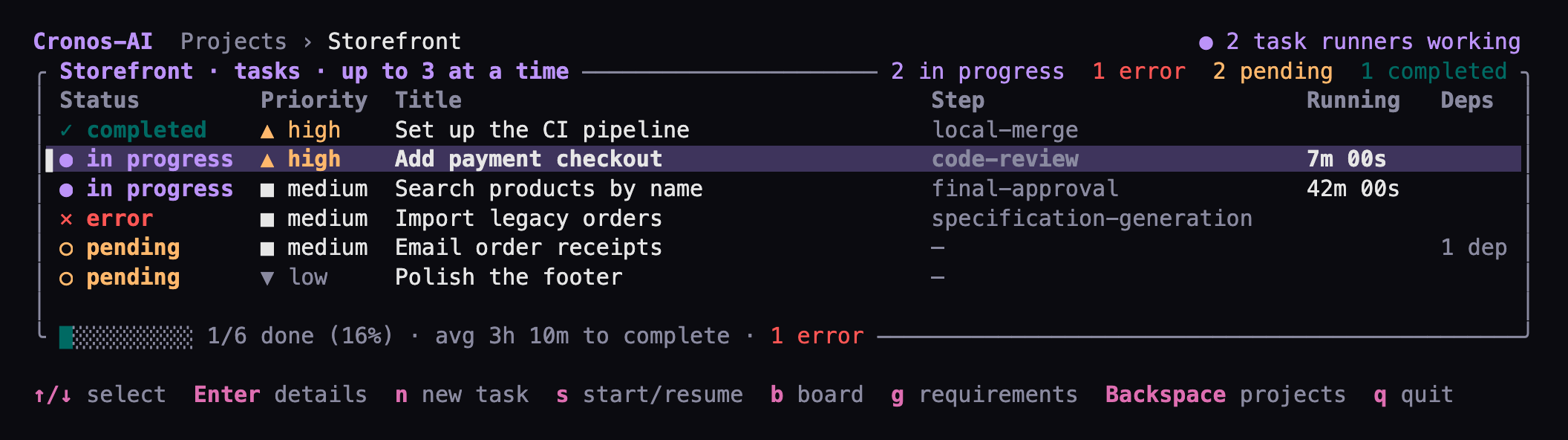
The Cronos-AI task list for a Storefront project with sample data: one completed task, two in progress at code review and final approval, one error, and two pending, with a progress summary and the keyboard shortcuts.
A project's task list with sample data. Up to three tasks run at a time, and the summary shows progress, average completion time, and errors.

On the project list, n creates a project and Enter opens its tasks. There, n adds a task, s starts ready tasks up to the project's capacity, b switches to the kanban board, and g opens the requirements and the task planner.

Prefer the command line?

Every project and task action is also a CLI command that prints JSON; supervising a running workflow still happens in the dashboard.

cronos-ai [--data-dir DIR] project create <name> [--description TEXT] [--repository PATH]
cronos-ai [--data-dir DIR] project set-check-command <project-id> -- PROGRAM [ARGS...]
cronos-ai [--data-dir DIR] project list
cronos-ai [--data-dir DIR] task create <project-id> <title> [--priority low|medium|high] [--depends-on TASK_ID[,TASK_ID...]]
cronos-ai [--data-dir DIR] task list <project-id>
cronos-ai [--data-dir DIR] task ready <project-id>

If --data-dir is omitted, Cronos-AI checks CRONOS_AI_DATA_DIR, then uses the platform's user data directory. See project and task commands for every command, including publishing, releases, parallel tasks, requirements, and planning.

More help

Reference pages